

Tuya Smart Lock for Airbnb: How to Manage Guest Access
Managing guest access is one of the practical challenges of running an Airbnb or holiday home. Physical keys need to be handed over, collected, and tracked, and late arrivals or changes to check-in times can make key exchanges inconvenient for both hosts and guests.
For property owners considering smart lock installation in Dubai, a Tuya-compatible model can offer an additional way to manage access. Depending on the lock model and configuration, hosts may be able to create temporary credentials, manage authorized users, and review certain access activity through a compatible app.

However, not every Tuya smart lock provides the same features. Some use Bluetooth, some support Wi-Fi connectivity, and others may require a compatible gateway for particular remote functions. Guest-access options also vary between models.
This guide explains how to use a Tuya smart lock for Airbnb to manage guest access, what to consider when creating temporary credentials, how to handle cleaners and maintenance staff, and what to do when a guest cannot unlock the door.
How Can a Tuya Smart Lock Help Airbnb Hosts?
Traditional key management can become inconvenient when a property has frequent guest turnover.
A guest may arrive later than expected. A cleaner may need access between bookings. A maintenance technician may need to enter while the owner is away. Physical keys can also be misplaced or accidentally taken by departing guests.
A compatible smart lock can simplify some of these situations by allowing access to be managed electronically.
Depending on the model, a Tuya-compatible lock may support access methods such as:
- PIN codes
- Fingerprints
- Access cards
- Mobile app controls
- Mechanical backup keys
- Temporary or time-limited credentials
For an Airbnb or holiday home, temporary credentials can be particularly useful because access may be separated among guests, cleaners, maintenance personnel, and property managers.
The exact capabilities depend on the lock, so hosts should confirm the required features before choosing a model.
How Should Airbnb Guest Access Work?

A good guest-access system should cover the entire stay, not just how the guest opens the door.
A typical process might look like this:
Booking confirmed → Guest access created → Instructions sent → Access becomes valid → Guest checks in → Stay ends → Access expires or is removed
The objective is simple: the current guest should have the access they need without unnecessarily retaining access after their stay.
Where a compatible lock supports temporary or time-limited credentials, a host may be able to create access specifically for a booking rather than repeatedly sharing the same permanent PIN.
This can also make access management easier when different people need to enter the property at different times.
Temporary Guest Access vs Remote Unlocking
These functions are related, but they should not be confused.
Temporary Guest Access
Temporary access provides the guest with an authorized credential that can be used in accordance with the lock's configuration.
For example, where supported, this could be a PIN that is intended for a particular guest or period.
The guest can then enter without requiring the host to manually unlock the door each time.
Remote Unlocking

Remote unlocking means an authorized user initiates an unlock command from outside the property.
Whether this is possible depends on the lock's connectivity and configuration. Some systems may require a compatible gateway or another internet-connected component for remote functionality.
For Airbnb management, temporary credentials can often provide a more practical workflow than requiring the host to respond every time a guest needs to enter.
If remote operation is important to you, our guide to Tuya smart lock remote unlocking explains Bluetooth, Wi-Fi, gateway requirements, and remote connectivity in more detail.
How to Create Guest Access With a Tuya-Compatible Smart Lock
There is no single procedure that applies to every Tuya-compatible lock.
The lock manufacturer determines which access methods are available and how they are configured. Always follow the instructions for the exact lock model.
A typical guest-access process may involve the following steps.
1. Confirm the Lock Is Working Correctly
Before creating guest access, make sure the lock operates correctly using your own authorized credentials.
Test the lock from both sides of the door where appropriate and confirm that the latch or bolt operates without excessive resistance.
2. Open the Lock's Management Settings
Use the app specified for the particular lock and select the correct device.
Make sure you are managing the correct property if several smart devices or locks are associated with the account.
3. Choose an Appropriate Guest Credential
Depending on the model, the lock may provide options such as PIN-based access or other supported guest credentials.
Choose an access method that is appropriate for the guest and the property.
4. Configure the Access Period Where Supported
If the lock supports time-limited credentials, configure access to align with the guest's permitted stay.
Check the settings carefully before sending the credential.
5. Send Clear Check-In Instructions
Don't send only a PIN or credential.
Guests should also know:
- Which door to use
- How to wake the keypad if necessary
- How to enter the credential
- How to confirm that the door has locked when leaving
- Who to contact if access fails
Clear instructions can prevent a simple user error from becoming an unnecessary lockout call.
6. Verify Access After Checkout
After the stay ends, confirm that the guest credential has expired or remove it according to your access-management procedure.
Then prepare the required access for the next booking.
Setting Check-In and Check-Out Access Times

Where supported by the particular smart lock, time-limited access can help hosts align door access with a guest's stay.
For example, access could be configured around the permitted check-in and check-out period rather than leaving a credential active indefinitely.
But hosts should allow for real-world situations.
A guest's arrival may be delayed. Checkout may be extended. A cleaner may need to enter immediately after departure.
The access settings should therefore match the property's actual operating process rather than being configured without considering these possibilities.
Most importantly, verify whether your particular lock supports the type of scheduled or temporary credential you want to use. Tuya compatibility alone does not guarantee it.
Should Every Airbnb Guest Have a Different PIN?
When the lock supports individual or temporary PIN management, using separate guest credentials can make access easier to control than repeatedly sharing a single permanent code.
If every guest receives the same permanent PIN, changing guests does not automatically change who knows the code.
Separate credentials can also make it easier to distinguish guest access from access used by cleaners, property managers or other authorized people.
However, PIN management features differ among smart locks. Some provide more detailed credential controls than others.
Check exactly how codes are created, changed, deleted and, where available, scheduled before choosing the lock for a rental property.
Managing Cleaners and Maintenance Staff
Guests aren't the only people who may need access to an Airbnb.
Between bookings, access may also be required by:
- Cleaners
- Property managers
- Maintenance technicians
- Inspection staff
- Other authorized service providers
When the lock supports multiple credentials, these users should ideally not need to share the same credential as guests do.
For example, a regular cleaner may have a separately managed credential, while a maintenance technician could receive temporary access where the system supports it.
This creates a clearer access-management structure.
These are access-management principles rather than features guaranteed on every Tuya-compatible lock.
What Should You Do After an Airbnb Guest Checks Out?
Guest checkout should trigger an access-management check.
If the guest used a temporary credential designed to expire automatically, confirm that it is no longer active.
If the credential does not expire automatically, remove or disable it according to the lock's instructions.
You should also check that:
- The door closes correctly
- The lock engages properly
- Batteries are not showing a low-power warning
- The next required credentials are correctly configured
- Backup access remains available to an authorized person
This is particularly useful before another guest arrives.
A smart lock does not eliminate property-access management; it gives you different tools for managing it.
Can You Manage Multiple Airbnb Properties With Tuya?
The available management options depend on the specific locks, applications, and configuration being used.
If you manage several holiday homes, don't assume that buying several products labeled “Tuya compatible” will automatically create a complete property-management system.
Before choosing hardware for multiple units, consider how easily you can:
- Identify each property and lock
- Manage authorized users
- Create and remove guest credentials
- Monitor battery status where supported
- Review relevant lock events where available
- Handle a lock or network problem remotely
- Provide backup access when necessary
For multiple properties, consistent hardware and access procedures can also make day-to-day management easier.
What If an Airbnb Guest's Code Doesn't Work?
When a guest says the door won't unlock, avoid immediately assuming that the smart lock has failed.
There are several possible causes.
Check the Credential
Confirm that the guest is using the correct PIN or other credential.
If the credential is time-limited, verify that it is currently valid.
Also make sure the guest is at the correct door if the property has multiple entrances.
Check How the Guest Is Entering the Code
A guest unfamiliar with the lock may simply be using the keypad incorrectly.
Provide clear instructions for waking the keypad, entering the PIN, and confirming the entry if the particular lock requires it.
Check the Battery
If the keypad is unresponsive, unusually dim, or the lock shows a low-power warning, battery power may be the issue.
If you suspect a dead smart lock battery, use the manufacturer's emergency access procedure rather than trying random power sources.
Different smart locks use different backup methods.
Check Whether Other Credentials Work
If possible, determine whether another authorized PIN, fingerprint, card, or other local credential works.
If one credential fails while others work, the problem may be related to that credential rather than the entire locking system.
Check the Door and Lock Mechanism
If the lock accepts the credential but struggles to move the latch or bolt, there may be mechanical resistance or a door-alignment issue.
A connectivity reset will not correct a physical alignment problem.
What If You Need to Unlock the Door Remotely for a Guest?
Remote unlocking may be available as a backup option on compatible systems, but it should not be assumed to work with every Tuya lock.
The capability depends on factors such as:
- Lock model
- Connection method
- Gateway requirements
- Network availability
- User permissions
- Manufacturer implementation
For example, some Bluetooth-based configurations may require a compatible gateway before certain remote functions are available.
This is why hosts who specifically require remote operation should verify that capability before purchasing the lock.
Our Tuya smart lock remote unlocking guide explains these connectivity differences in greater detail.
What Happens If the Internet Goes Down?
An internet outage does not necessarily mean the guest will be unable to enter.
Depending on the smart lock, local access methods such as a PIN, fingerprint, card or mechanical key may continue to operate independently of internet-based remote functions.
However, functions that depend on internet connectivity may become unavailable until the connection is restored.
Before using a smart lock in a holiday home, know what will happen if:
- The property's internet stops working
- A gateway goes offline
- The host's phone has no connection
- The lock loses power
- A guest cannot use the intended credential
This is another reason to have a documented backup-access procedure.
What Happens If the Smart Lock Battery Dies During a Guest Stay?
Battery failure is particularly inconvenient in a short-term rental because the person standing outside the door may not be familiar with the lock.
Some models provide low-battery warnings before power is completely depleted, but hosts should not rely on the guest noticing or understanding those warnings.
Battery condition should therefore be checked as part of routine property management.
If the batteries become depleted, the appropriate emergency access method depends on the lock. Depending on the model, that could involve a mechanical backup key, external emergency power, or another manufacturer-supported procedure.
Our guide to what to do when a smart lock battery dies explains these options in more detail.
After emergency access is restored, address the battery issue rather than treating emergency power as a permanent solution.
Guest Access vs Owner Access
Not every person entering a holiday home needs the same level of access.
The property owner or administrator may require ongoing control over lock settings, while a guest generally needs only the ability to enter during an authorized stay.
Similarly, a cleaner may require recurring operational access without needing administrator privileges.
Where supported, separating these roles can make the system easier to manage.
The principle is:
Give each person the access they need without unnecessarily giving them broader control over the lock.
Exactly how this is implemented depends on the lock and its software.
Should You Use Remote Unlocking or a Temporary PIN?
For routine guest check-in, a temporary credential can be more practical where the lock supports it.
The guest does not need the host to be available every time the door is opened.
Remote unlocking can instead serve as an additional capability where supported—for example, when an authorized person needs access and another suitable credential is unavailable.
The better arrangement depends on how the property is managed.
For a frequently occupied Airbnb, consider how the system handles not only guest arrivals but also repeated entries during the stay, check-out, cleaners, and emergency access.
Choosing a Tuya Smart Lock for an Airbnb or Holiday Home
Don't choose a smart lock only because it has an attractive keypad or advertises app connectivity.
Start with the door itself.
Check:
- Door material
- Door thickness
- Existing lock or mortise
- Backset
- Handle configuration
- Opening direction
- Existing cut-outs
- Required access methods
Then consider the electronic features.
If guest management is the priority, determine whether the lock provides the type of temporary access you need.
If remote management is important, identify whether the lock uses Bluetooth, Wi-Fi or a gateway and which functions are actually available remotely.
Also consider backup access and battery management.
Our broader guide to smart locks for Airbnb can help you compare the features that matter when selecting a lock for a short-term rental property.
What If the App Works but the Door Still Won't Unlock?
This is an important distinction.
A smart lock has both an electronic side and a mechanical side.
If the app communicates with the lock and the lock accepts an authorized command but the bolt or latch cannot move correctly, the problem may be related to:
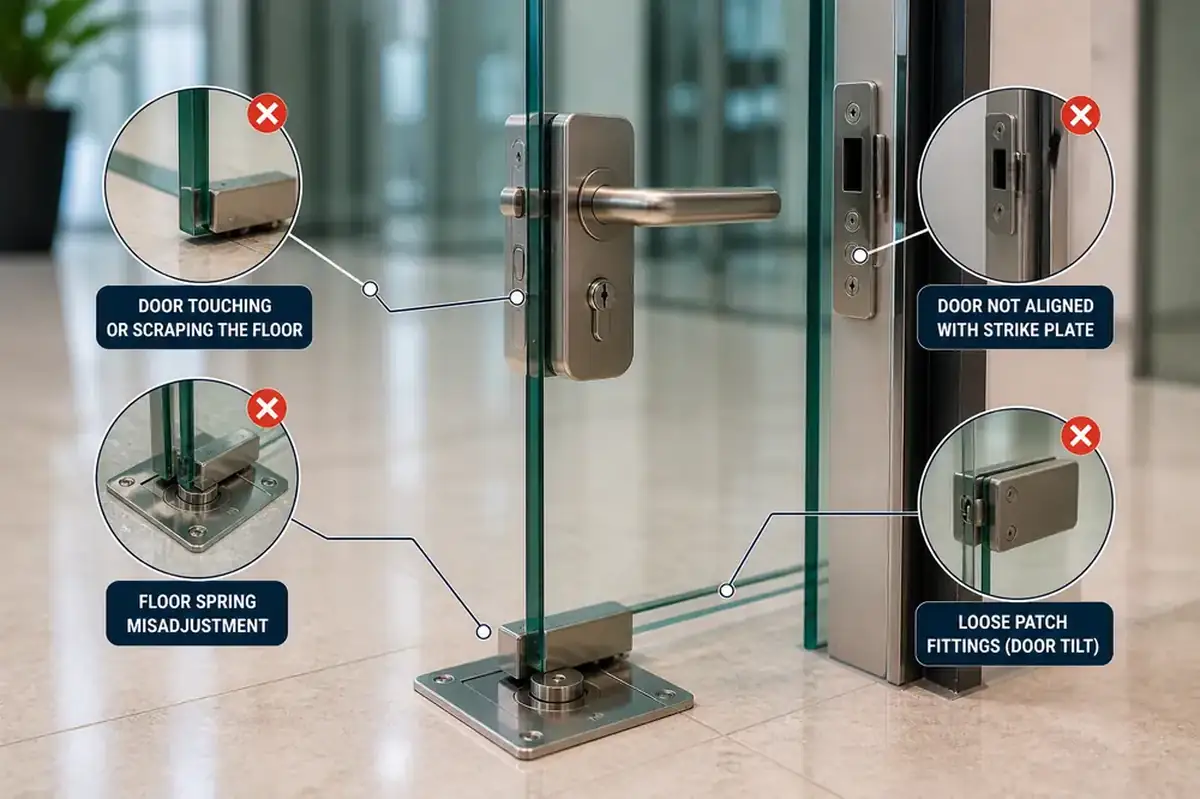
- Door alignment
- Strike alignment
- Mechanical resistance
- Lock installation
- Internal lock hardware
Similarly, if the lock operates normally while the door is open but struggles when the door is closed, alignment should be investigated.
In this situation, repeatedly deleting the app, changing Wi-Fi settings, or factory resetting the device may not solve the underlying problem.
If the issue appears to involve the physical door or locking mechanism, a locksmith in Dubai can inspect the installation and determine whether the system's mechanical components require attention.
Is a Tuya Smart Lock Suitable for Every Airbnb?
Not necessarily.
A Tuya-compatible smart lock can be useful for properties where electronic guest access management fits the host's operating process, but the right solution depends on the door, property, and required features.
Before installation, consider:
How will guests enter?
PIN, card, app or another supported credential?
How will access expire?
Automatically where supported, or manually?
Who else needs access?
Cleaners, maintenance staff or property managers?
What happens when something fails?
Battery failure, internet outage, gateway problem, or mechanical lock issue?
What is the backup-access method?
Answering these questions before installation is more important than simply choosing a lock because it supports Tuya.
Frequently Asked Questions
Can I Give an Airbnb Guest a Temporary PIN With a Tuya Smart Lock?
Some Tuya-compatible smart locks support temporary or time-limited PINs. Availability and configuration vary by model, so check the exact lock specifications.
Can an Airbnb Guest Use the Lock Without Installing an App?
Potentially, yes. If the particular lock supports credentials such as PINs or access cards, a guest may not need an app for normal entry.
Does a Tuya Smart Lock Need Wi-Fi for Guest Access?
Not necessarily. It depends on the lock and the access method being used. Local credentials may work differently from internet-dependent remote functions.
Do I Need a Gateway for Airbnb Guest Management?
It depends on the lock and the functions you require. Certain Bluetooth-based configurations may require a compatible gateway for remote functionality.
Can a Guest PIN Expire Automatically After Checkout?
Some locks support time-limited credentials. Do not assume this feature is available on every Tuya-compatible smart lock; confirm it for the particular model.
Can My Cleaner Have a Different Code From Guests?
Where the lock supports multiple independently managed credentials, separate access can be configured for different authorized users.
Can I Remotely Unlock the Door If a Guest's PIN Fails?
Possibly, if the lock and its connectivity configuration support remote unlocking. A gateway or other internet-connected component may be required depending on the model.
What Happens If the Smart Lock Battery Dies?
Electronic functions may become unavailable. Emergency-access options vary by model and may include a mechanical backup key, external emergency power or another manufacturer-supported method.
Should I Use the Same PIN for Every Airbnb Guest?
Where individual or temporary credentials are available, using separately managed guest access gives you greater control over who has an active credential after each stay.
Smarter Guest Access Starts With the Right Lock
A Tuya smart lock for Airbnb can make guest access easier to manage, but the value comes from choosing the right lock and setting up a reliable access process-not simply connecting a door lock to an app.
For holiday homes, consider the complete guest journey: providing access before arrival, giving clear instructions, managing cleaners and maintenance staff, removing or expiring access after checkout, and having a backup plan if the battery, network, or physical lock develops an issue.
If you're considering installing a smart lock in Dubai for an Airbnb or holiday home, make sure the lock is mechanically compatible with the door and that its actual Tuya features align with how you intend to manage guests.


.png)